
In recent years, Next.js has solidified its place as a leading framework in modern web development, often positioned alongside tools such as React, Angular, and Vue for building production-ready applications. The discussion that follows is grounded in a revival effort of a large-scale enterprise application that originated from an older Angular-based codebase.
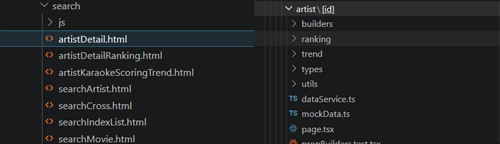
Comparison between legacy Angular template structure (left) and Next.js App Router-based file routing (right).
The legacy system relied on template-driven HTML rendering, where page composition was tightly coupled with view templates. Migrating to Next.js introduced a fundamentally different paradigm: file-based routing and the App Router model. This shift required restructuring how routes, layouts, and components were organized. In place of template inheritance, layout nesting and adjacent components were adopted, resulting in clearer boundaries and improved scalability.
Rendering Strategies and the Caching Trade-off
From a technical standpoint, one of the most impactful decisions involved selecting the appropriate rendering strategy for each part of the application. Static generation (SSG) was applied to content that did not change frequently, whereas server-side rendering (SSR) was used for pages requiring up-to-date data. Incremental Static Regeneration (ISR) was selectively introduced to balance performance with content freshness, particularly for semi-dynamic content.
This hybrid approach was favored for certain pages because it reduced unnecessary server load, maintained acceptable data accuracy, and preserved strong SEO performance. For example, SSR was preferred for the artist and song details pages to ensure that frequently updated data was always current, whereas ISR was used for CMS-managed pages where slight delays in updates were acceptable.
To operationalize ISR in practice, a revalidation interval was explicitly defined:
// ISR example
export const revalidate = 3600;
export default async function Page() {
  const data = await fetch('https://api.example.com/content')
    .then(res => res.json());
  return <div>{data.title}</div>;
}
This value of 3,600 seconds (one hour) was chosen as a pragmatic balance between content freshness and system performance. CMS-managed pages contents, in most cases, do not change frequently within short intervals. By allowing cached pages to persist for up to an hour before regeneration, the application significantly reduced server load and avoided unnecessary rebuilds.
However, caching introduced non-trivial complexity. Multiple caching layers build time, request time, and data level caching required careful coordination. In scenarios where real-time updates were expected, cached responses occasionally led to stale data being served. Resolving these issues required explicit revalidation strategies and stricter control over cache lifetimes, reinforcing that performance gains come with operational trade-offs.
Server-Side Logic: Security, Efficiency, and Debugging Realities
Server side API handling was another defining characteristic of the architecture. Data fetching and sensitive operations were executed on the server, preventing direct exposure to the client. While this improved security and reduced client-side overhead, it also altered debugging workflows.
// Sample /api route handler
// app/api/user/route.ts
export async function GET() {
  const data = await fetch(process.env.API_URL + '/user').then(res => res.json());
  return Response.json(data);
}
A notable case emerged during the reconstruction of several pages. Some UI components visible in the production system were not present in the legacy codebase, requiring reverse engineering of API dependencies through browser network inspection. While this approach worked effectively in local environments, data discrepancies appeared after deployment to staging and development environments.
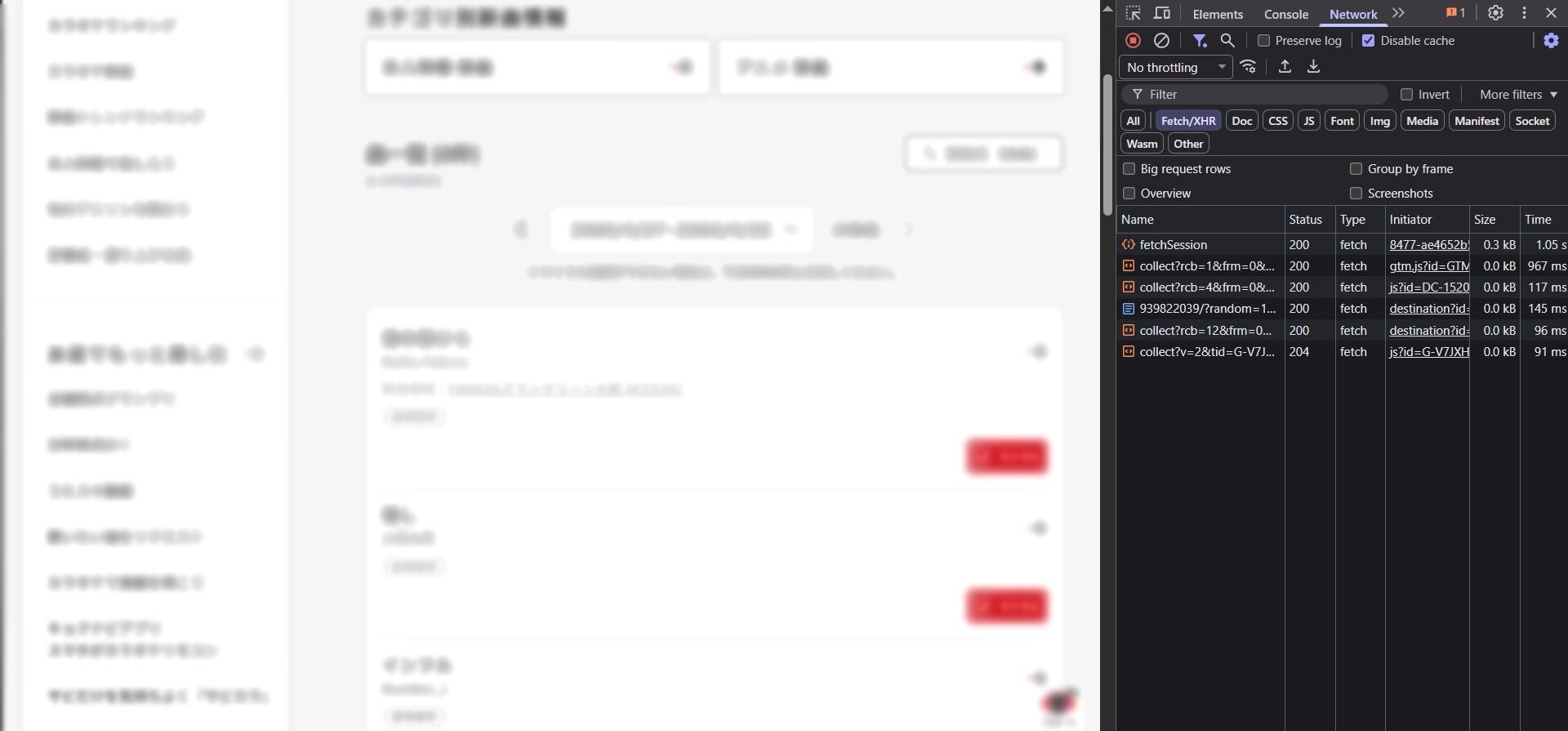
Server-side API requests are not visible in the browser network tab when using Next.js.
Because server-side API requests are not visible in the client browser’s developer tools, debugging requires external API clients such as Postman and Bruno. By querying endpoints directly and comparing responses across production, staging, and development environments, it was discovered that certain components were inadvertently consuming production data instead of environment specific endpoints. The root cause was traced back to misconfigured environment variables. Although the debugging process was more involved, the architecture ensured that sensitive API interactions remained concealed from the client, reinforcing security best practices.
Built-in Routing, Clean Architecture, and Ecosystem Compatibility
Next.js also enforces separation of concerns through its routing system and dedicated /api routes. Backend-like functionality, including authentication, logging, and request transformation, was centralized using route handlers and middleware. This reduced coupling between UI and business logic, making the system easier to reason about and maintain over time.
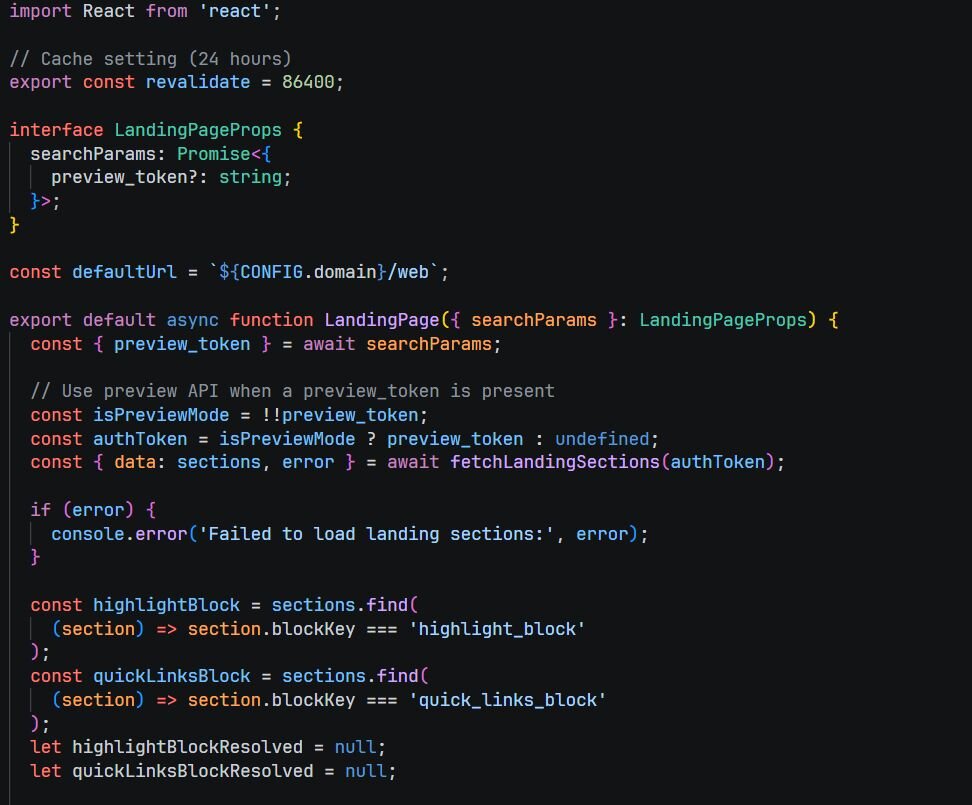
Example of Incremental Static Regeneration (ISR) configuration in Next.js in a page component.
Component design introduced another layer of architectural decision-making. A clear default rule was established: server components for data-driven rendering, client components for interactivity. During early development of the homepage, elements such as lists, panels, and static media were implemented as server components, while interactive elements like carousels, dropdowns, and embedded widgets required client-side execution.
// Sample Client Component
'use client';
import { useState } from 'react';
export default function Carousel() {
  const [index, setIndex] = useState(0);
  return <button onClick={() => setIndex(index + 1)}>Next</button>;
}

// Sample Server page component
export default async function Page() {
  const data = await getData();
  return <div>{data.title}</div>;
}
This distinction was not always straightforward. Some components initially implemented as server components required refactoring when interactivity was introduced. In these cases, partial client wrapping was applied, isolating interactive segments while preserving server rendered sections for performance. This pattern demonstrated the flexibility of Next.js in enabling granular control over rendering behavior.
The ecosystem further accelerated development. Because Next.js is built on React, existing libraries for state management, UI components, and data handling were integrated without significant modification. This reduced development time and allowed focus to remain on application specific logic rather than rebuilding foundational tooling.
Documentation Quality, and Developer Onboarding
The framework’s documentation provided detailed explanations of rendering strategies, caching mechanisms, and architectural patterns. This transparency enabled informed decision making, particularly when balancing trade offs between performance, scalability, and developer experience.
For teams already familiar with React, the transition to Next.js required minimal onboarding. Core concepts such as components, hooks, and state management remained consistent, while the framework introduced structured conventions for routing, data fetching, and deployment.
A Practical Verdict
Overall, Next.js enhances the React ecosystem by introducing a cohesive full-stack model, optimized rendering strategies, and built-in performance features. Despite the complexity in caching, server-side debugging, and component boundary decisions, the framework provides the tools necessary to build scalable, secure, and maintainable applications in real-world enterprise environments.
Thinking About Migrating Your Legacy Application?
Migrating a large-scale application from a legacy framework to a modern stack like Next.js is a high-stakes decision that involves more than just switching tools. It requires careful architectural planning, deliberate rendering strategy choices, and hands-on experience navigating the challenges that only surface in production environments. Monstarlab Philippines has the technical depth and delivery experience to guide that transition from assessment through deployment. Talk to the Monstarlab Philippines team today.
—
Author: Ethan Jex Atienza, Full-stack Developer at Monstarlab Philippines
—
References:
https://nextjs.org/docs/app/building-your-application/rendering
https://nextjs.org/docs/app/deep-dive/caching
https://nextjs.org/docs/app/building-your-application/routing/route-handlers
https://nextjs.org/docs/pages/building-your-application/routing/api-routes
https://nextjs.org/docs/app/building-your-application/routing/middleware