Software applications have become indispensable to modern organizations, supporting critical business processes, managing sensitive information, and delivering digital services. As organizations continue to rely on these applications, maintaining their security has become equally important to ensuring operational continuity and protecting organizational assets.
However, the longevity and continuous evolution of software applications often introduce security challenges alongside new functionality. Applications are frequently updated to accommodate changing business requirements, integrate emerging technologies, and improve user experience, yet each enhancement may inadvertently introduce new vulnerabilities or expose previously undiscovered weaknesses. Application security testing approaches such as Static Application Security Testing (SAST) and Dynamic Application Security Testing (DAST) provide different perspectives for identifying and examining these security concerns, with SAST analyzing source code and DAST evaluating the behavior of a running application. At the same time, threat actors continuously refine their attack techniques, actively targeting software vulnerabilities to gain unauthorized access, compromise sensitive information, disrupt business operations, or establish persistent footholds within enterprise environments.
To proactively identify these security risks, organizations employ various application security testing techniques, including Vulnerability Assessment and Penetration Testing (VAPT), to identify exploitable weaknesses. However, identifying vulnerabilities is only the first step. Understanding reported findings, determining appropriate remediation, and validating that implemented changes addressing the underlying security concerns are equally important aspects of maintaining an application's security posture.
Drawing from practical experience in maintaining enterprise applications, this article examines how SAST and DAST can support the investigation and validation of security remediation. The discussion covers their use in examining reported security findings, identifying additional concerns, and verifying whether implemented changes have addressed identified vulnerabilities.
Security Findings and the Remediation Challenge
Security findings can originate from a variety of application security activities, including VAPT assessments, source code analysis, and runtime testing. These findings may involve insecure coding practices, authentication and session management weaknesses, insecure configurations, or vulnerabilities in application components. If left unaddressed, such weaknesses may expose sensitive information, affect application functionality, or provide opportunities for unauthorized access.
However, identifying a security finding is only the beginning of the remediation process. A reported issue must first be understood and validated to determine its applicability, severity, and underlying cause. Automated security tools may also produce false positives or identify issues that require additional investigation before remediation can be considered appropriate. Consequently, security findings should not be treated simply as a checklist of issues to eliminate; they require technical analysis and informed remediation decisions.
This challenge can be particularly significant when maintaining mature or legacy applications. Understanding a finding may require knowledge of secure coding practices, security standards, vulnerability references, or framework-specific behavior that may not be immediately familiar to developers. At the same time, remediation must account for existing application functionality and the potential effects of changes to established systems.
Security remediation therefore extends beyond implementing a fix. The resulting changes should also be evaluated to determine whether the underlying security concern has been addressed. SAST and DAST can support this process by providing complementary perspectives: SAST can examine potential weaknesses within source code, while DAST can evaluate security behavior in a running application. Their use during investigation and validation is discussed in the following sections.
Using SAST During Investigation and Remediation
1. Applying SAST to Identify Security Weaknesses
Static Application Security Testing (SAST) analyzes an application's source code to identify insecure coding patterns that may introduce security weaknesses. Unlike VAPT, which evaluates an application's externally observable security, SAST provides visibility into the underlying implementation and can therefore help identify and investigate source-code-level security concerns. Its findings can also extend beyond vulnerabilities identified through external assessments, providing an additional perspective during security investigation and remediation.
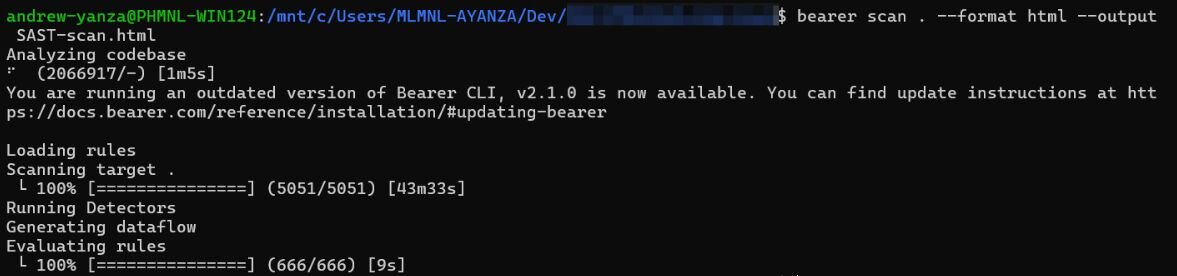
Figure 1. An execution of the Bearer CLI SAST scan command in a WSL Linux terminal
In one of the maintained applications, a client asked whether a security scan had been performed for the application. To conduct the security assessment, the team selected Bearer CLI as its SAST tool because it is free and open source - available under the Elastic License 2.0 and can generate detailed security reports through a simple command-line interface. An initial scan was performed against the application's source code, as shown in Figure 1, producing hundreds of findings across Critical, High, Medium, and Low severity levels. These results provided the team with an initial overview of potential security weaknesses and a basis for further investigation and remediation.
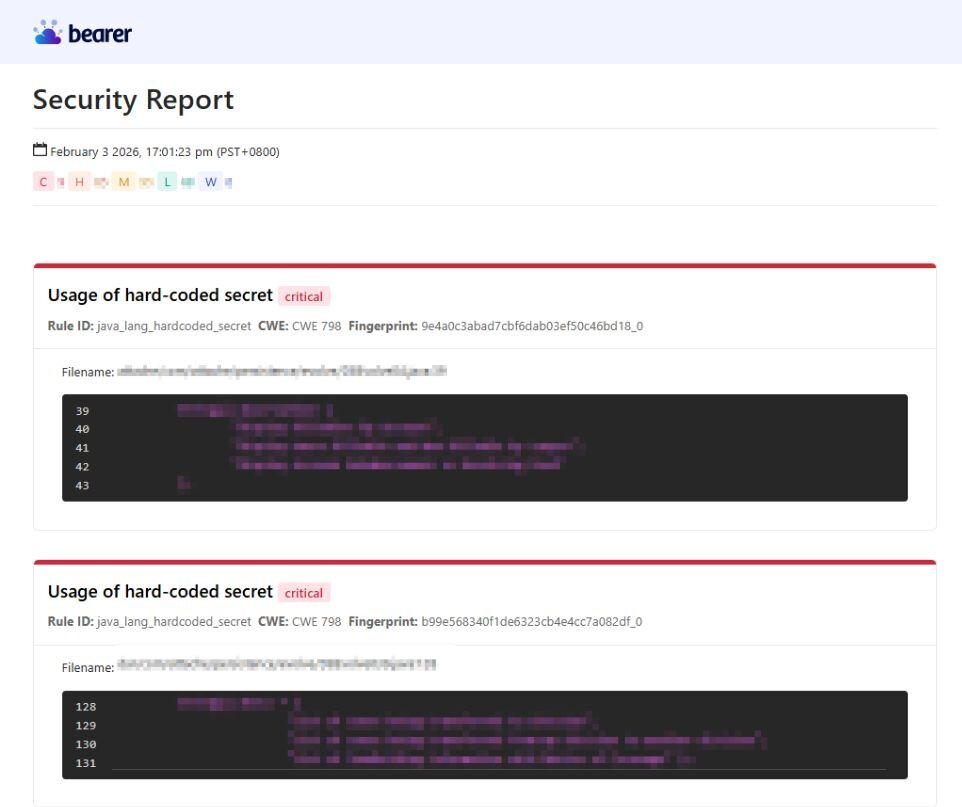
Figure 2. A Bearer CLI SAST HTML report generated from the source code of the program
The results, presented in the generated SAST HTML report as shown in Figure 2, provided a starting point for systematic investigation. Each finding included information such as the affected file and line, vulnerability type, description, and remediation guidance, allowing the affected source code to be inspected directly. Findings were prioritized according to severity, with Critical findings addressed first, followed by High and Medium findings, while Low-severity findings were given lower priority.
The scan also identified security concerns that had not been identified through the client’s assessment. Examples included hard-coded secrets, unsanitized external input in SQL queries, unsanitized user input in HTTP responses, and the use of external input in code reflection. This demonstrated the value of SAST as a broader source-code security assessment rather than simply a tool for checking a predefined set of vulnerabilities.
2. Investigating and Remediating SAST Findings
The SAST report was treated as the starting point for investigation rather than as a list of fixes to apply without further analysis. For each finding, the affected source code was inspected to understand why the reported implementation could introduce a security weakness. Bearer's descriptions, remediation recommendations, and references to resources such as OWASP and CWE provided additional information for understanding the underlying vulnerability and determining an appropriate fix.
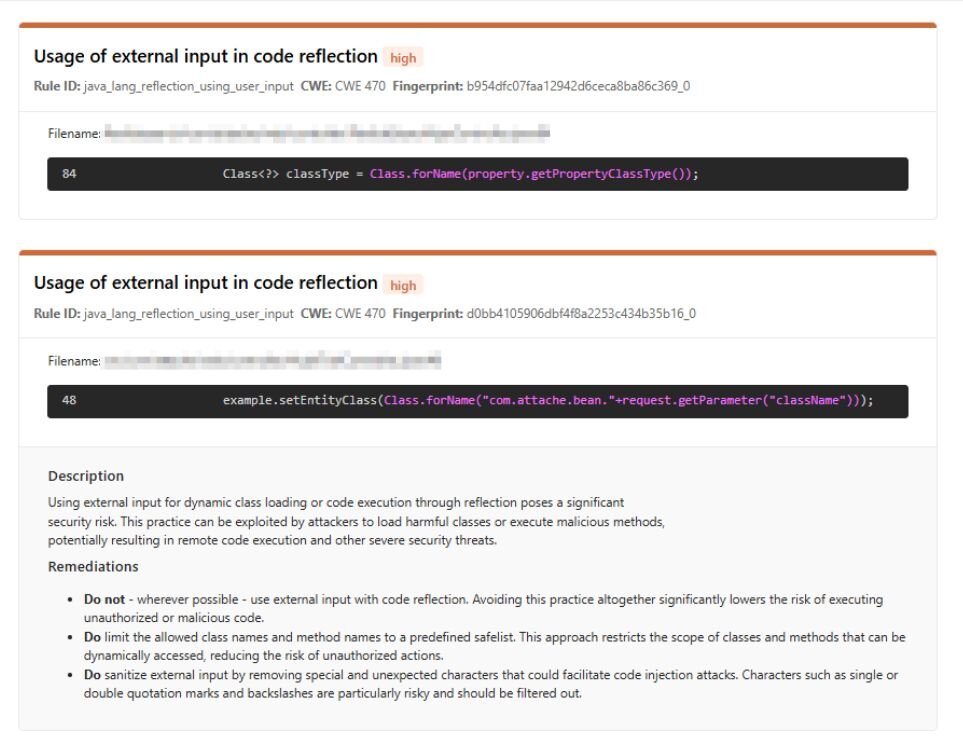
Figure 3. A flagged high severity vulnerability, “Usage of external input in code reflection,” from the Bearer SAST HTML report
One finding involved the use of external input in code reflection, where a request parameter was used to construct a class name passed to Class.forName(), as shown in Figure 3. Although the application was intended to load only specific classes, the implementation allowed the className parameter to be manipulated to load other classes within the permitted package. The remediation introduced a whitelist of the expected class names, allowing the application to proceed with Class.forName() only when the requested class matched an approved value; otherwise, the request was rejected.
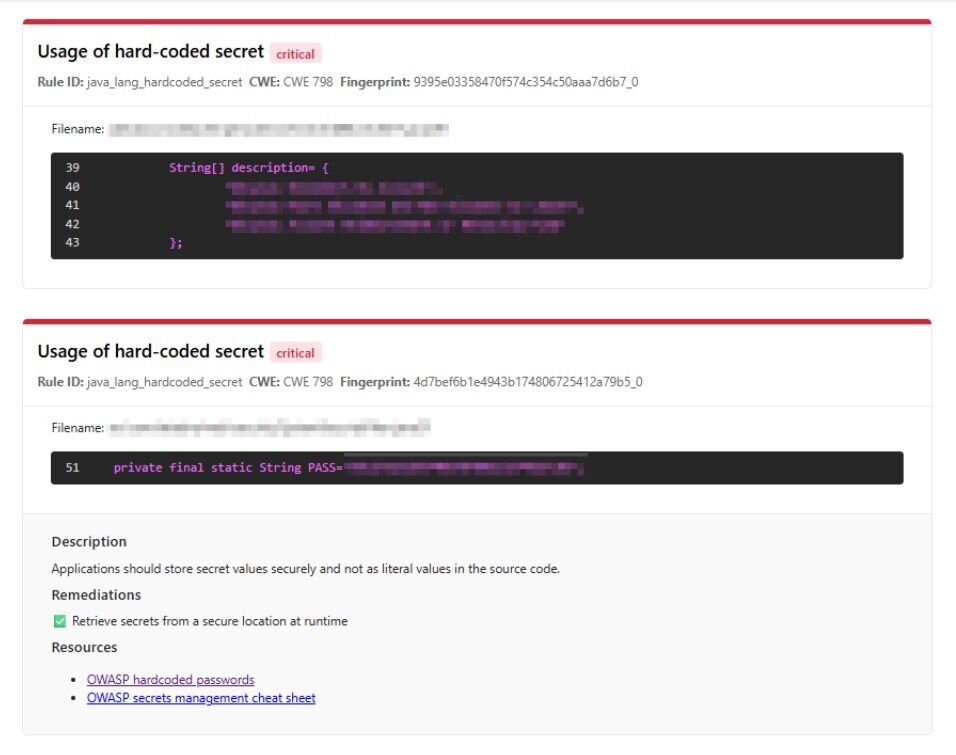
Figure 4. A flagged critical severity vulnerability, “Usage of hard-coded secret,” from the Bearer SAST HTML report
As shown in Figure 4, another finding involved a genuine hard-coded secret. A variable containing a value resembling a credential was identified in the source code. Unlike other hard-coded-secret alerts that proved to be false positives after inspection, this finding represented an actual security concern. The value was removed from the source code and replaced with an environment-based configuration approach.
These examples also demonstrated the importance of triaging automated findings. Some Bearer alerts, particularly hard-coded-secret findings, did not contain actual secrets and were determined to be false positives after reviewing the source code. Such findings were excluded from subsequent scans rather than modified unnecessarily in code. Findings associated with third-party dependencies were also treated separately from vulnerabilities in application-owned code, with dependency upgrades considered where appropriate rather than directly modifying external library code.
3. Verifying the Remediation Through SAST
After changes were implemented, the modified source code was directly inspected to verify that the intended security controls had been applied. For example, the code reflection issue was reviewed to confirm that externally supplied class names were restricted through a whitelist, while the hard-coded secret remediation was checked to verify that the value was obtained through an environment variable rather than being embedded in the source code. The SAST scan was then run again, and the results were compared with the previous report. The absence of the previously reported findings in the subsequent report provided an indication that the specific source-code issues had been addressed. Combining direct inspection of the remediation with the SAST rescan provided a more reliable means of validating the changes than relying solely on the absence of findings in the automated report.
The experience with another maintained application demonstrated, however, that SAST could not provide the same level of visibility for every security concern. In that application, SAST was used alongside an externally provided VAPT assessment and DAST testing, but several reported issues involved application behavior that could not be determined from source code alone. Runtime concerns such as security headers and session-cookie attributes required examination of the running application, making DAST more appropriate for their investigation and validation.
Using DAST to Investigate and Validate Security Remediation
1. Investigating the Application Through DAST
While SAST provides visibility into an application's source code, Dynamic Application Security Testing (DAST) complements this approach by evaluating how an application behaves during execution. By interacting with a running application in a manner similar to an external user, DAST can identify runtime security issues that cannot be observed through static analysis alone, such as insecure HTTP headers, session management issues, authentication weaknesses, and injection vulnerabilities.
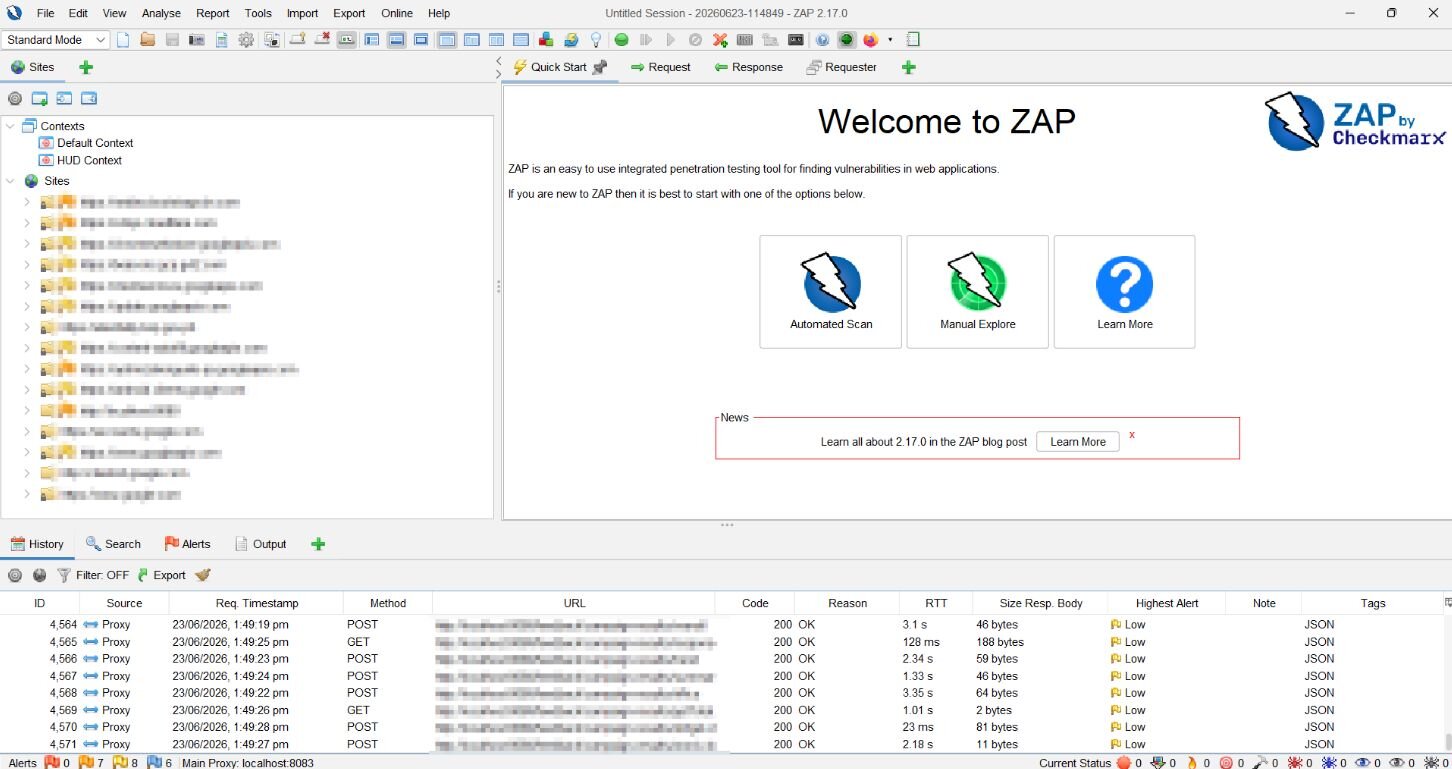
Figure 5. The interface for ZAP 2.17.0, showing the main workspace and available tools for web application security testing.
For another maintained enterprise application, the client provided VAPT findings that required investigation and remediation. The team used Zed Attack Proxy (ZAP) by Checkmarx — formerly the OWASP ZAP project — as its primary DAST tool, as shown in Figure 5, due to its comprehensive scanning capabilities and support for automated security testing. Upon receiving VAPT findings, an initial DAST assessment was performed against the running application. Before automated scanning could begin, however, the application first required manual exploration through the browser-based interface, as illustrated in Figure 6. This process involved authenticating into the application, navigating its available features, and interacting with its functionality so that ZAP could build an accurate representation of the application's accessible pages and endpoints.
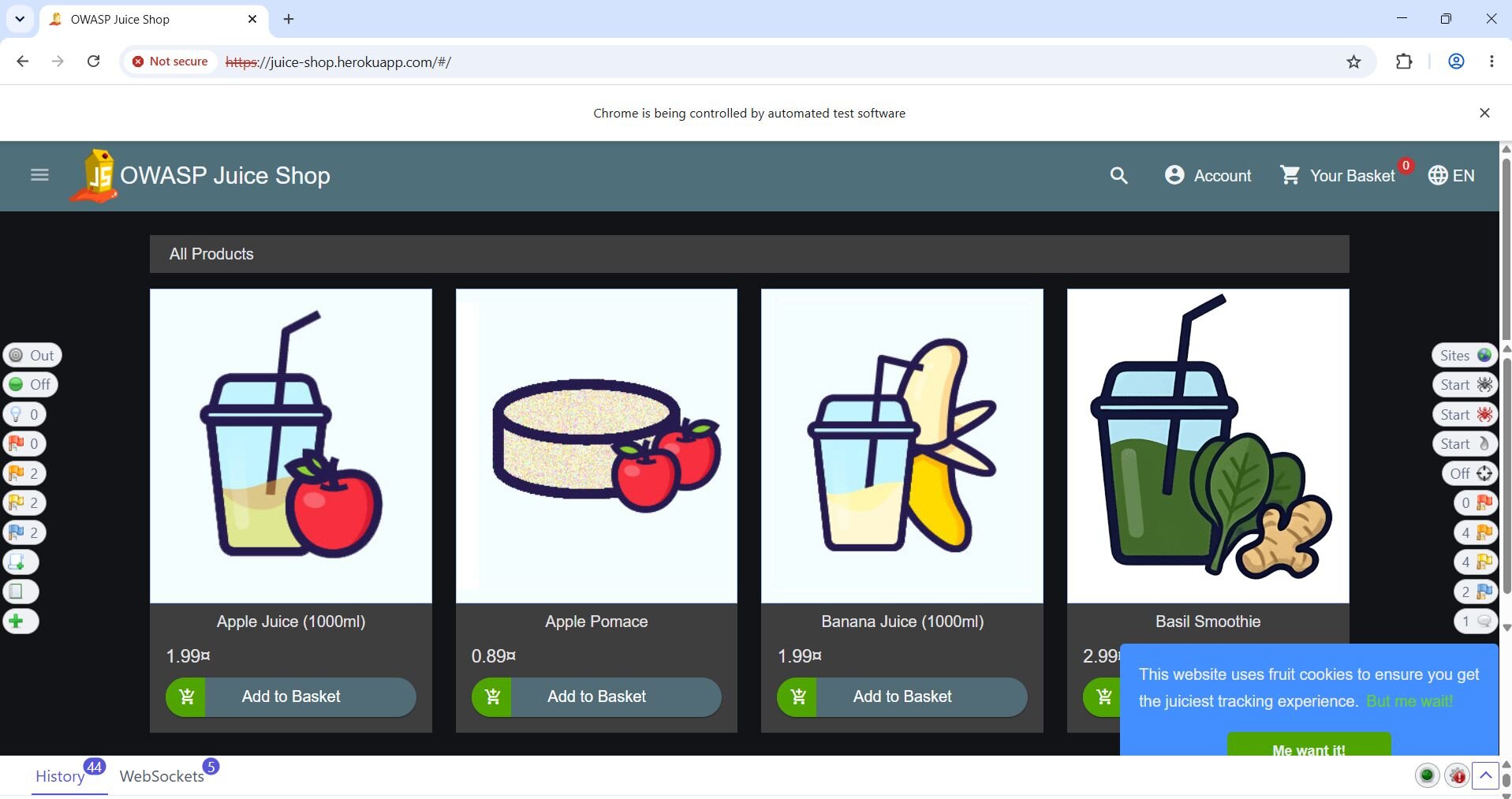
Authentication was particularly important for obtaining meaningful coverage of the application. A basic automated scan could primarily reach the login page when no valid session was established, while authenticated functionality remained inaccessible. During manual exploration, the application's login process was therefore recorded through ZAP so that the resulting session could be used when subsequent requests were made. This allowed ZAP to access protected pages and endpoints rather than repeatedly being redirected to the login page. The application was deliberately explored across its major functions before automated scanning, providing ZAP with broader context for subsequent analysis.
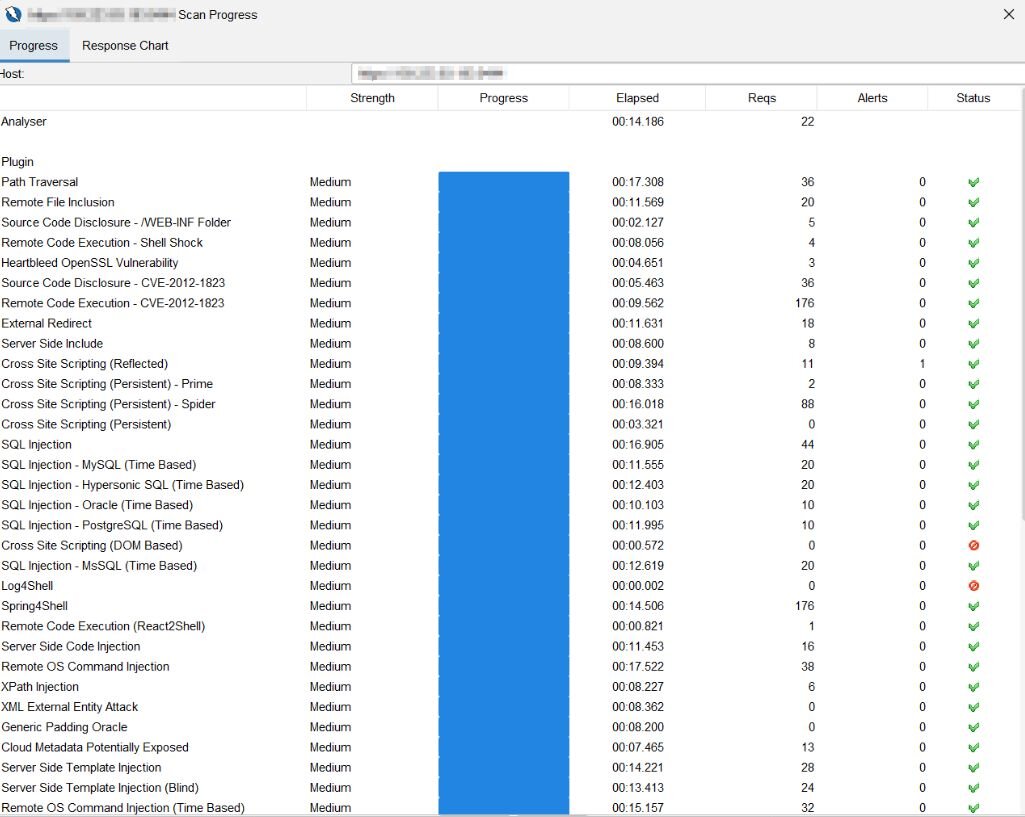
Figure 7. A ZAP active scan of the application using the Default Policy, showing scan progress and the security tests being performed.
Following manual exploration, ZAP's passive scanning and spidering capabilities were used to further discover and analyze the application's accessible resources. Both the Traditional Spider and AJAX Spider were used to expand the site tree, while the active scanner subsequently performed security tests against the discovered functionality, as shown in Figure 7. The resulting report, as shown in Figure 8, provided findings based on the application's observed behavior and the responses generated during scanning, allowing the results to be compared with the vulnerabilities identified in the original VAPT assessment.
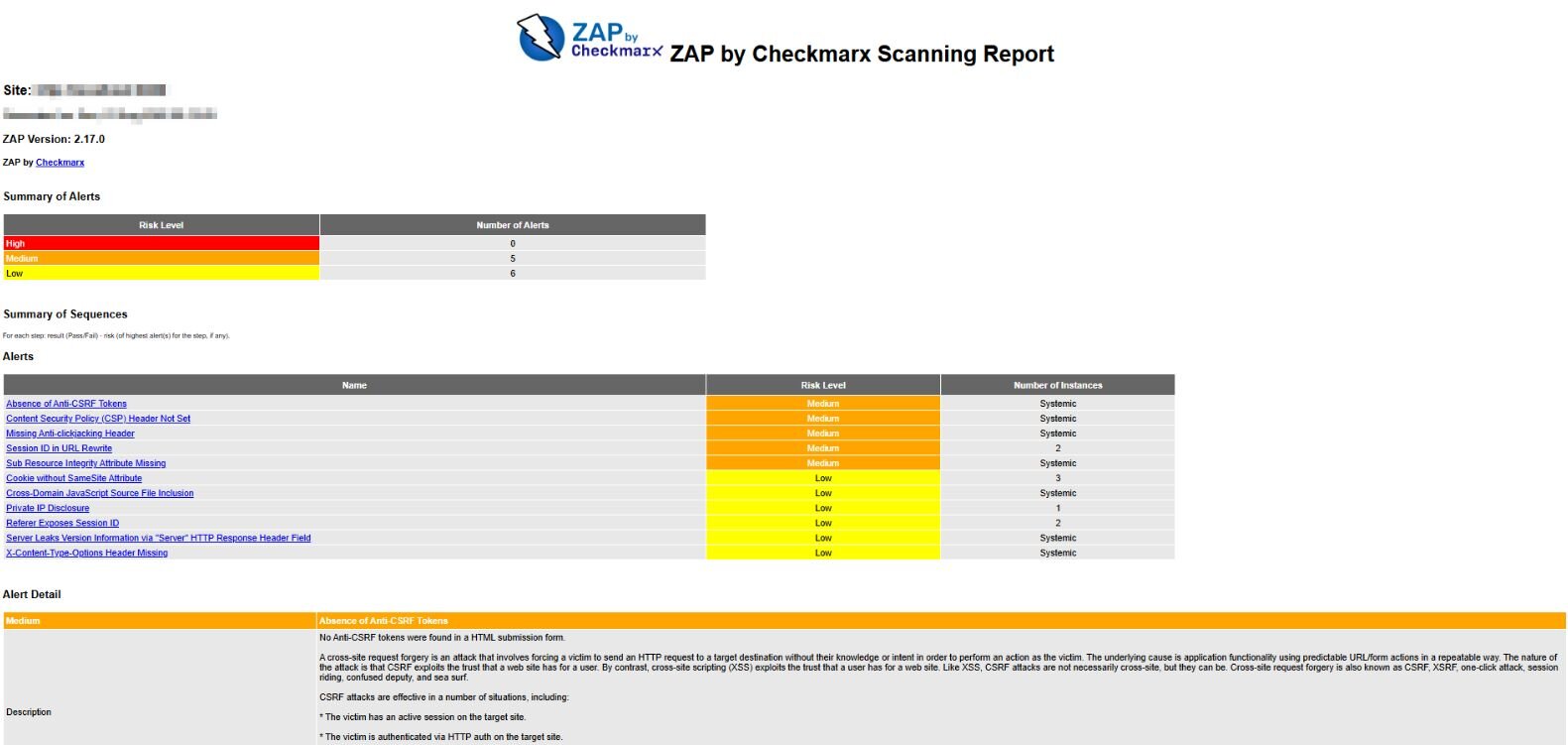
Figure 8. A sample ZAP Traditional HTML Report generated from the application
The DAST results provided an additional means of investigating whether reported security conditions were present in the running application. In some cases, findings corresponded with issues identified in the VAPT report, while the DAST assessment could also expose security conditions that were not apparent from the original assessment. This was particularly useful for findings involving runtime behavior, where examining the application's actual HTTP requests and responses provided evidence that could not be obtained through source-code analysis alone.
2. Investigating Runtime Security Findings
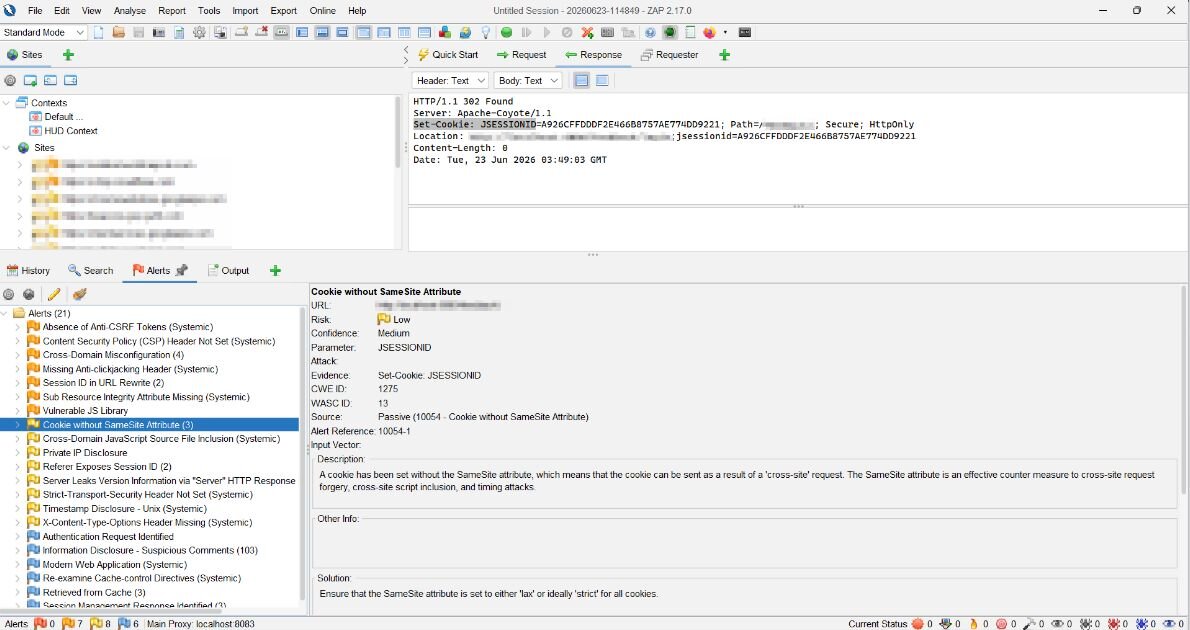
Figure 9. A detailed ZAP alert for an identified security finding “Cookie without SameSite Attribute” in the application
One VAPT finding involved insecure session-cookie configuration for the application's JSESSIONID cookie, which lacked the SameSite, HttpOnly, and Secure attributes. The SameSite attribute is highlighted here as a primary example of how DAST was used to investigate and validate a specific security condition. DAST was used to investigate the finding against the running application. As shown in Figure 9, ZAP reported a "Cookie without SameSite Attribute" alert, with the scan evidence showing that the SameSite attribute was absent from the observed cookie.
Further investigation established that the session cookie was managed by the application container rather than directly by the application's business logic. The remediation was therefore applied at the container level, configuring the session cookie to include SameSite=Lax. This demonstrated the importance of understanding where a reported security behavior originates before determining how it should be remediated.
3. Validating the Remediation
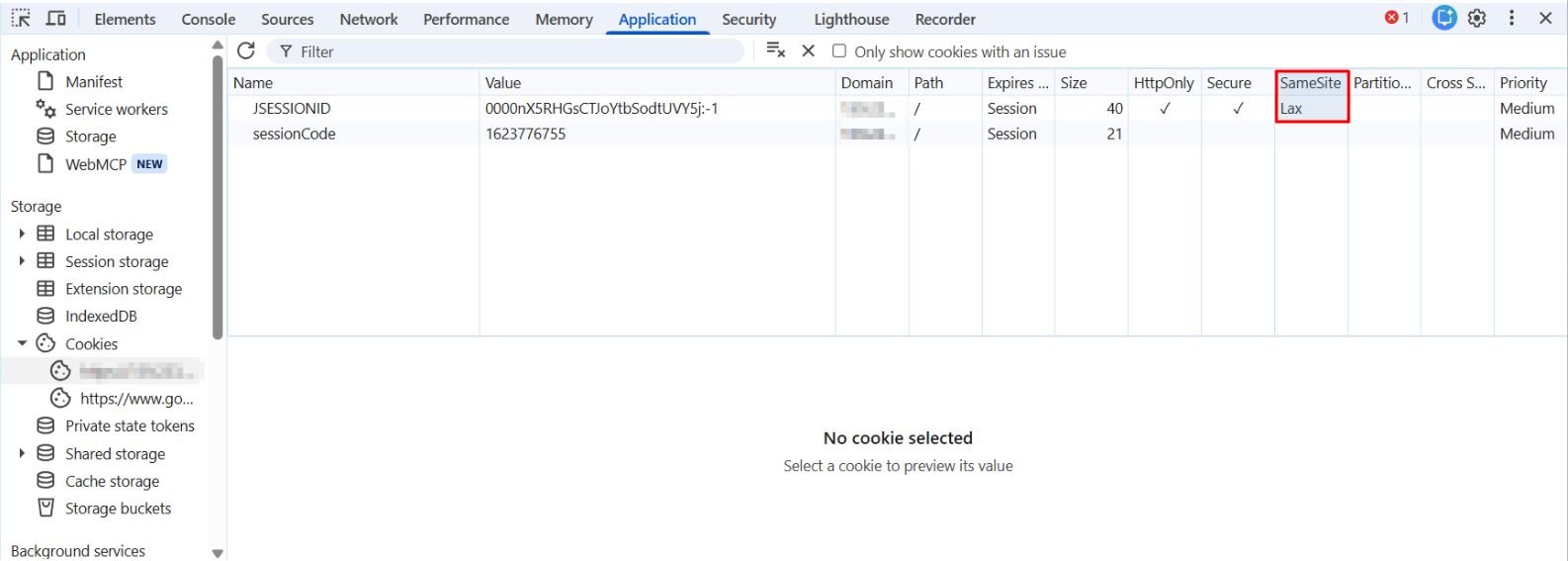
Figure 10. Direct verification of the SameSite=Lax cookie attribute using browser developer tools
After the remediation was implemented, the application’s session cookie was directly inspected using browser developer tools to verify that the SameSite attribute was present in the running application, as shown in Figure 10. This direct inspection provided primary evidence that the intended configuration had been applied to the application’s runtime behavior. The DAST process was then repeated, and the resulting report was compared with the previous scan. The relevant cookie finding was no longer reported, providing confirmation that the specific security condition identified during the initial assessment had been addressed. The combination of direct runtime verification and a DAST rescan provided a more reliable means of validating the remediation than relying solely on the absence of a finding in the automated report, which sometimes result from scanner coverage gaps rather than a deployed fix.
Practical Lessons Learned
Applying both SAST and DAST throughout the investigation and remediation process highlighted several practical lessons that extended beyond the capabilities of either approach alone:
- Automated Security Reports Should Support, Not Replace, Developer Judgment
Automated findings from SAST and DAST required investigation and triage before remediation. The SAST reports produced both genuine vulnerabilities and false-positive findings, including hard-coded-secret alerts that did not contain actual secrets after source inspection. Dependency-related findings also required different treatment from vulnerabilities in application-owned code. Similarly, the DAST reports provided evidence of runtime security conditions, but the findings still required investigation to determine their relevance and the appropriate remediation. These experiences demonstrated that automated security reports are most effective as inputs to security investigation rather than checklists of changes to apply without further analysis.
- Understanding the Vulnerability Is Part of the Remediation
The appropriate fix could not always be determined from the scanner output alone. A reflection finding required understanding how externally supplied input influenced class loading and why restricting the accepted classes through whitelisting addressed the underlying issue. Likewise, the session-cookie finding identified through DAST required determining that the cookie was managed by the application container before applying the remediation at the appropriate configuration level. These experiences showed that effective remediation depends not only on identifying a vulnerability, but also on understanding how it arises within the application and where the security control should be applied.
—
Author: Andrew Yanza, Full Stack Developer at Monstarlab Philippines
—
Resources:
- Bearer CLI (GitHub) - source code, licensing, and language support
- Bearer CLI Official Documentation
- Checkmarx Joins Forces with ZAP to Supercharge Dynamic Application Security Testing (DAST) for the Enterprise and Enhance Community Growth
- CWE - Common Weakness Enumeration
- Dynamic application security testing (DAST)
- OWASP Top 10 2025
- What is static application security testing (SAST)?
- What Is VAPT (Vulnerability Assessment & Penetration Testing)?
- Zed Attack Proxy (ZAP) by Checkmarx Official Documentation